The OOBE protocol
The OOBE is a web application, ms-cxh:// protocol is a custom handler that defines a couple of shortcuts to various pages, seemingly, for internal use. The list of available protocol strings can be retrieved by scanning Windows binaries for the ms-cxh:// occurrences. Here, I’ve compiled a whole list of links that are related to the OOBE.
Out-of-Box Experience
FRX stands for «First Run eXperience
RDX stands for «Retail Demo eXperience
ms-cxh://FRX/AAD
ms-cxh://FRX/INCLUSIVE
ms-cxh://FRX/TEAMEDITION
ms-cxh://FRXRDXINCLUSIVE
Microsoft Azure
The AAD acronym is commonly used and refers to Azure Active Directory; SSPR stands for Self-Service Password Reset.
ms-cxh://AADPINRESETAUTH
ms-cxh://AADSSPRms-cxh://AADWEBAUTH
Modern settings
MOSET probably refers to «Modern settings;
MAM stands for «Mobile Application Management.
MSA stands for «Microsoft Account
ms-cxh://MOSET/AADLOCAL
ms-cxh://MOSET/CONNECTTOWORK
ms-cxh://mosetmamconnecttowork?mode=mdm&username=%s&servername=%s
ms-cxh://mosetmdmconnecttowork
ms-cxh://MOSETMSA
ms-cxh://MOSETMSALOCAL
Microsoft account
ms-cxh://MSACFLPINRESET
ms-cxh://MSACFLPINRESETSIGNIN
ms-cxh://MSACXSIGNINAUTHONLY
ms-cxh://MSACXSIGNINPINADD
ms-cxh://MSACXSIGNINPINRESET
ms-cxh://MSAPINENROLL
ms-cxh://MSAPINRESET
ms-cxh://MSARDX
ms-cxh://MSASSPR
Windows Hello for Microsoft Intune
NTH stands for iNTune Hello
NGC stands for Next Generation Credential
ENT stands for Enterprise
MDM stands for Mobile Device Management
ms-cxh://NTH
ms-cxh://NTH/AADRECOVERY
ms-cxh://NTHAADNGCFIXME
ms-cxh://NTHAADNGCONLY
ms-cxh://NTHAADNGCRESET
ms-cxh://NTHAADNGCRESETDESTRUCTIVE
ms-cxh://NTHAADNGCRESETNONDESTRUCTIVE
ms-cxh://NTHAADORMDM?ngc=enabled
ms-cxh://NTHENTNGCFIXME
ms-cxh://NTHENTNGCONLY
ms-cxh://NTHENTNGCRESET
ms-cxh://NTHENTNGCRESETDESTRUCTIVE
ms-cxh://NTHENTORMDM
ms-cxh://NTHENTORMDM?ngc=enabled
ms-cxh://NTHNGCUPSELL
ms-cxh://NTHPRIVACY
ms-cxh://RDXRACSKUINCLUSIVE
Second-chance OOBE
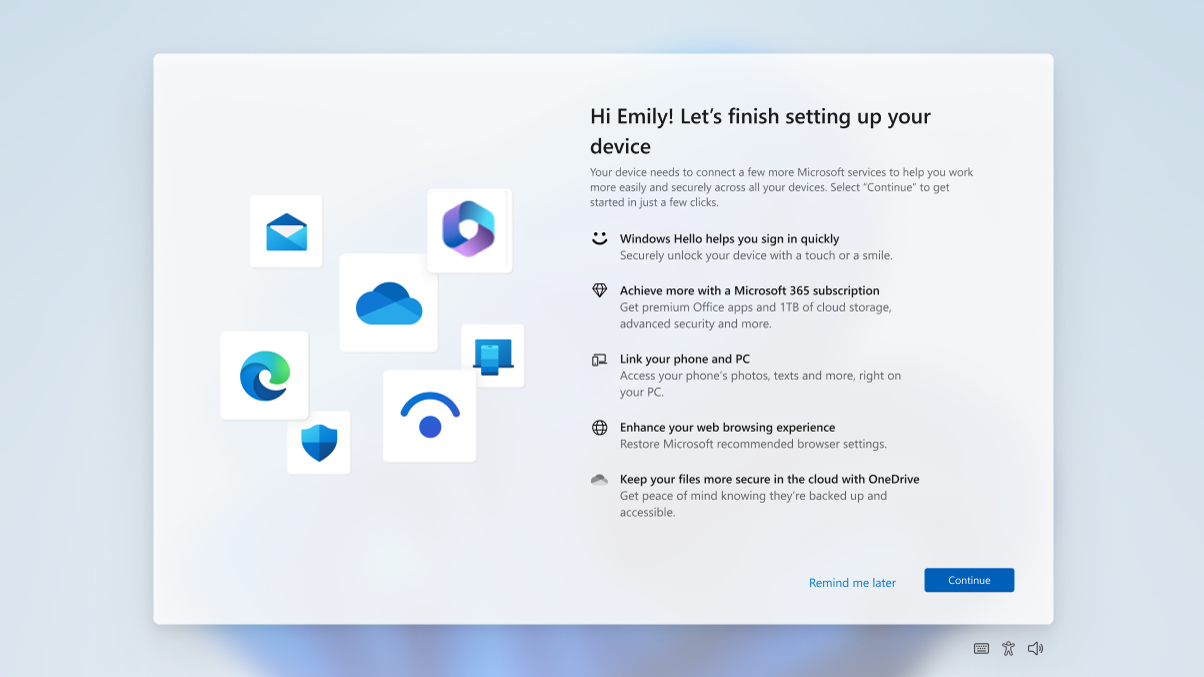
The Second-chance OOBE appears after you have compleated the initial OOBE and what happens when a billion dollar company gets greedy? They want more Data! So here they beg you to sign up for their services at a low cost and “free” Besides that, here are some of the links for the 2nd chance OOBE.
ms-cxh://SCOOBEms-cxh://SCOOBE%wsms-cxh://SCOOBE/UPGRADE
Cloud settings
ms-cxh://SETADDLOCALONLYms-cxh://SETADDNEWUSERms-cxh://SETCHANGEPWDms-cxh://SETPHONEPAIRINGms-cxh://SETPHONEPAIRING scenarioId=SwiftKeyCloudClipboardms-cxh://setsqsalocalonly
Miscellaneous
ms-cxh://TSET/ADDFAMILYms-cxh://WLTms-cxh://WLTUC